
skimlinksabout ditesco
Home > WordPress > How To And Why Should You, Install WordPress In Your Computer

How To And Why Should You, Install WordPress In Your Computer

by DiTesco on October 7, 2011

instant wordpress portable

I have always wanted to install a local WordPress copy on my PC and have been having a hard time doing it. Reason being is that I am not a tech savvy guy and most of the tools or tutorials available out there can be too complicated. I wanted an easy solution, one that does not fry my brains out, and if at all possible free, why not? Thanks to Lisa of 2ceateawebiste, my quest for searching the near to perfect solution has ended. She introduced me to Instant WordPress, a powerful WordPress tool, that made me say wow. After installing it (no brainer), and giving it a test run, I changed my mind and said to myself – triple wow!

Anyway, before getting into the nuts and bolts of Instant WordPress, let’s look first at some reasons why you may want to install a copy of WordPress on your local computer. I am sure that there could be a lot more reasons, but over the top, these are what I can come up with:

  • You don’t need to have a domain name or web server to run a WordPress site in a local environment. This is ideal when you want to test WordPress themes, plugins, and changes you may want to do in your site without doing it live. Think of all the mess you can avoid :) .
  • You may want to create some video tutorials about a lot of things. An example can be a video on how to install and configure a certain plugin. The advantage of being able to create videos with your local PC is that you don’t have to rely on an internet connection. Some weeks ago, I was having problems with my connection and while preparing a video, I has to stop it somewhere in the middle because my connection decided to take a break. Wasted time and effort.
  • If you provide WordPress services, you can easily show a client or potential client, how their site can look like, among other things. You may even want to give them a “test” site for them to play around with. This is great to boost their confidence in a lot of things and is also a good “training” environment for them. This can avoid you the headache of having to “redo” everything if they for reason accidentally damage their live website.
  • You may want to “replicate” an existing website to another and avoid all the process of spending time to tweak, and configure a new site. This is actually a time saver, if you create niche sites
  • And, as I said, perhaps many more reasons…

About Instant WordPress
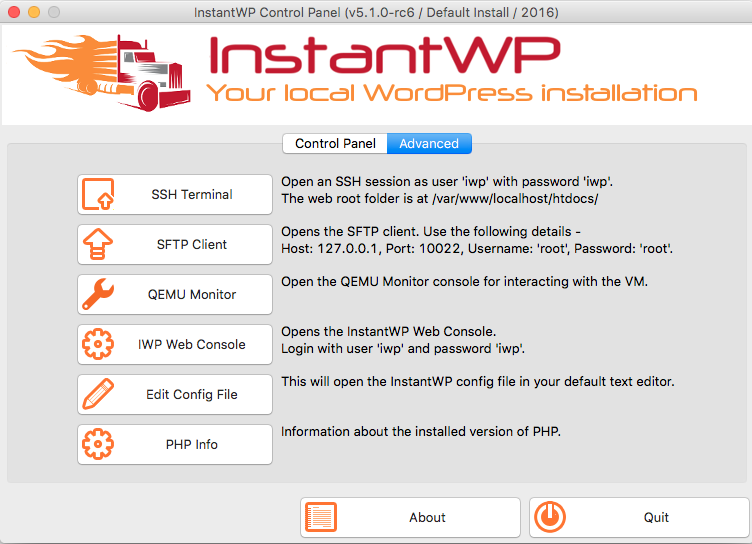
Instant WordPress Local

Instant WordPress is just as the name suggest. It gives you the full power of WordPress, in a local environment, instantly. It allows you to do everything I mentioned above easily and quickly without having to worry about the technical aspect of it. Installing Instant WordPress is as easy as downloading it, skimming a bit through the documentation, and you are good to go. Now for the best and most awesome part of this tool, it runs on a USB Stick! That’s right, portable WordPress (link to YouTube – same as below) at the tip of your fingers, a complete standalone solution. It comes with WP 3.2 version, Apache, PHP, MySql and dummy content. All this without messing with your PC’s configuration (like registry for example). It runs on its own.. How cool is that?

Watch the video below for an example (quality is not top notch, sorry)

Alright then, I won’t try to push you a lot more into using this tool. I am not getting paid to write this post and there are no affiliate links either. I am just amazed that such a powerful tool is free and only you decide whether you want to use it or not. If you are looking to install a WordPress local version in your PC, I can’t think of any alternative right now that beats this one.

What do you think? Is this something that you can put into good use? What other reasons can you think of that warrants the use of Instant WordPress?

You May Also Like:

  1. WordPress Junkies, New WordPress Social Network Is Born
  2. Protect Your Online Business, Free WordPress BackUp Solutions
  3. 62 WordPress Plugins, For Beginners, Intermediate And Advanced Users
  4. How To Find WordPress Plugins That Affect Your Sites Performance?

Article by

+DiTesco is a Business Consultant, an Online Entrepreneur and founder of iBlogzone. iBlogzone's main objective is to help you achieve success in your online ventures. iBlogzone does this by providing internet users the necessary resources and tools to help you build a profitable home based business. | More About Me and my Consulting Services.

has written 433 articles at iBlogzone.com

{ 30 comments… read them below or add one }

1 Justin Germino
Twitter:
October 7, 2011 at 6:36 pm

I just create test subdomains on my hosting provider and use Wordpress auto installs :) One reason is that most people run Windows and their hosting provider typically has Wordpress on Unix/Apache so the architecture isn’t identical for sandbox and testing purposes.

Reply

2 DiTesco
Twitter:
October 7, 2011 at 7:24 pm

Hi Justin. Thanks for your input. I am however confused as according to InstantWP, the components that are installed are the following software:

WordPress 3.2
Apache 2.2.15 (Win32)
PHP 5.3.2
MySQL 5.1.46-community-nt

Does the above not “simulate” the same architecture as a hosting provider?

Reply

3 RonLeyba
Twitter:
October 7, 2011 at 8:09 pm

Great one for wordpress theme developers as well. A good testing ground for coders and designers. Thanks for sharing this DiTesco!
RonLeyba invites you to check out ..The Kitchen Musical – Interesting Photos, Videos And Full Cast InfoMy Profile

Reply

4 DiTesco
Twitter:
October 9, 2011 at 3:59 pm

You are welcome Ron. I hope you enjoy using this tool. Let me know how it goes for you :)

Reply

5 Lye Kuek Hin
Twitter:
October 8, 2011 at 5:08 am

Hi DiTesco,

This is definitely a tool that i am looking for. As you know using a theme framework tends to lead me trying out different function. I am not a programmer, this is a good tool as i can avoid crashing my site if i do anything wrong. Thanks a lot for the recommendation.
Lye Kuek Hin invites you to check out ..5 Uncomplicated Blogging Tips to Grow Your BlogMy Profile

Reply

6 DiTesco
Twitter:
October 9, 2011 at 4:02 pm

Hey Lye, good to see you here. A pleasure as always. Anyway, I am glad you found this tool something that could be useful for you.. I love it, and as you said, it is made for us “less” tech savvy guys :) Let me now how it goes if you use it soon..

thanks for stopping by my friend

Reply

7 Satrap
Twitter:
October 8, 2011 at 6:14 am

Hey fransisco,

When I first had started my blogging, I actually went through the whole process of installing WP locally, because people had told me for a newbie a local wp is great for testing things out, tweaking without really screwing your actual live blog.

But, I am not a technical person, there was a lot of thing I couldn’t figure out and I simply gave up. Instead I started doing what Justin is doing, making test subdomains and using the subdomain as a guinea pig.

But it seems like this toll can make things much faster and easier. I’ll give it a go. Thank for the heads up.
Satrap invites you to check out ..How Does Facebook Make Money?My Profile

Reply

8 DiTesco
Twitter:
October 9, 2011 at 4:04 pm

You are welcome.. this tool will definitely be a great help when you decide to test themes, etc… I am suing it extensively now as I am actually testing a new theme for another website I have. It is really an awesome tool. Have you installed it yet?

Reply

9 Satrap
Twitter:
October 11, 2011 at 9:13 pm

Yeah I have installed it today. Just playing around with it to get the hang of it. Thanks again for the heads up Fransisco.
Satrap invites you to check out ..Ways To Make Money OnlineMy Profile

Reply

10 Swamykant
Twitter:
October 9, 2011 at 8:29 am

I generally use XAMPP. It is a good tool.

Nice post.
Swamykant invites you to check out ..Day Zero Project: To Plan Your Next 1001 DaysMy Profile

Reply

11 DiTesco
Twitter:
October 9, 2011 at 4:04 pm

This is better than XAMPP, lol. Hope you test and like it..

Reply

12 Jane | Successful Blogging
Twitter:
October 9, 2011 at 10:02 am

Fran, this sounds brilliant. I will need this since I deal with a lot of styling websites :) It will be great to have a local copy to play with ;)
Jane | Successful Blogging invites you to check out ..Email Autoresponder: How To Use It For Your Subscribers’ BenefitMy Profile

Reply

13 DiTesco
Twitter:
October 9, 2011 at 4:06 pm

Hi Jane. That’s exactly the idea, play with it as much as possible. With this tool, I get confident changing things without having to worry about damaging live websites. I really like it and I do hope you find this tool useful for you.. Great for making videos too :)

Reply

14 Sanjeev
Twitter:
October 9, 2011 at 1:15 pm

This looks a good process, Wordpress local installation is really important, I do lot of changes and would like to test it locally before putting live on the blog.
Sanjeev invites you to check out ..How to Use Windows Live Writer with WordPress BlogMy Profile

Reply

15 DiTesco
Twitter:
October 16, 2011 at 12:00 pm

Hi Sanjeev. Like you I also like to run tests of things before actually making changes. This tool really is very helpful and I hope you find good use for it too.. Thanks for stopping by

Reply

16 Vernessa Taylor
Twitter:
October 9, 2011 at 9:27 pm

Hi DiTesco,

I’m curious as to why you say it is better than XAMPP? Do you mean because it specifically for WordPress installs?
Vernessa Taylor invites you to check out ..Customer Referral Systems: Automation is Your Secret KeyMy Profile

Reply

17 DiTesco
Twitter:
October 11, 2011 at 11:56 am

Hi Vernessa. My thoughts exactly. The only reason why I say that it is better is because it is tailored specifically for WP and nothing else. Considering that the platform is rapidly becoming the choice of preference by many, I think that InstantWP is more suitable than an “Apache Web Server” friend :)

Reply

18 Online Opportunities
Twitter:
October 10, 2011 at 6:43 am

This is a tool that I really need, since I want to change the theme of my blog to thesis but I fear to make all the changes on my live wordpress, thanks for sharing Francisco…

Kostas | Opportunities Planet
Online Opportunities invites you to check out ..How To Get Started With BloggingMy Profile

Reply

19 DiTesco
Twitter:
October 11, 2011 at 12:23 pm

You are welcome Kostas. If you are thinking of changing to Thesis, this tool will definitely help you get familiar with the theme first and do your experiments before put it live. Good luck!
DiTesco invites you to check out ..SEO Tips, Tools, Plugins And ResourcesMy Profile

Reply

20 Online Opportunities
Twitter:
October 12, 2011 at 11:37 am

I used it and it really help me re design my blog using thesis, but do you know how could I export the changes on my live wordpress without doing manually all the changes, I would truly appreciate your help :)

Kostas | Opportunities Planet
Online Opportunities invites you to check out ..5 Website Usability Tips that Drive ResultsMy Profile

Reply

21 DiTesco
Twitter:
October 12, 2011 at 2:44 pm

Hi Kostas. It depends what changes you have made. If you changed you Custom_functions file for example, just copy and paste it on your custom editor file. If they are plugins, I suggest to install it directly on the live version and configure it the same way you did on your testing. I hope this helps. If not, can you tell me what changes or modifications have you done?

Reply

22 Online Opportunities
Twitter:
October 14, 2011 at 7:06 am

I was wondering if there is a tool to import all the changes instantly to my live wordpress but I suppose I have to spend some time to do this, anyway thanks for the help, right now I am checking every change I made on my local wordpress and hope to have it live next week…

Kostas | Opportunities Planet
Online Opportunities invites you to check out ..Do you make the most of Email Marketing?My Profile

Reply

23 Ricardus
Twitter:
October 10, 2011 at 7:15 am

Hi Francisco,

This is really awesome. Can’t wait to test it.
Ricardus invites you to check out ..Oktoberfest with 50% off for Freedom PlanMy Profile

Reply

24 DiTesco
Twitter:
October 11, 2011 at 12:24 pm

You are welcome. Happy testing :)

Reply

25 Ikenna Odinaka
Twitter:
October 13, 2011 at 8:57 pm

I found your post while searching for another alternative for working with wordpress locally. I’ve tried XMAPP and WPI with one error after another. Thanks for sharing thid. I’ll have to give it a try
Ikenna Odinaka invites you to check out ..Having a Hectic day? How to Use your mobile phone to keep up your blog after a long dayMy Profile

Reply

26 DiTesco
Twitter:
October 14, 2011 at 9:52 am

Hi Ikenna. I’m lad that you found about this tool via my blog. I do hope you find it useful. It is much easier to use this than XMAPP for sure. Let me know how it goes for you.
DiTesco invites you to check out ..SEO Tips, Tools, Plugins And ResourcesMy Profile

Reply

27 Sherryl Perry
Twitter:
October 14, 2011 at 7:14 pm

Thanks for taking the time to document this so well Francisco. This is something that I really need to do.
Sherryl Perry invites you to check out ..Could Your Business Survive if Something Happened to You?My Profile

Reply

28 DiTesco
Twitter:
October 16, 2011 at 12:03 pm

Hi Sherryl. This is really a must thing to have specially if you like to play around with designs and all that stuff. Right now, I ma just loving playing around with.. Have you heard about this tool before? Appreciate you dropping by

Reply

29 Tania Shipman
Twitter:
October 15, 2011 at 2:09 am

Thanks so much for this information. I like having the options to try out plugins and theme changes without breaking my sites
Tania Shipman invites you to check out ..Why Blogging?My Profile

Reply

30 DiTesco
Twitter:
October 16, 2011 at 12:06 pm

Hi Tania. You are welcome. This tool will allow you to do just that.. Try out themes and plugins before putting it live. A note on plugins.. if you are not using the same structure as your live site, the test results may not be the same for a live site. If you want to see exactly how it it will work, I suggest you use the same theme for testing. Thanks for stopping by

Reply

Leave a Comment

  Twitter (ID only. No links or "@")

CommentLuv badge

{ 1 trackback }

Previous post:

Next post: