
How To Design Your Template On Blogger?
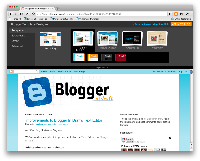 Blogger dot com has been bit by bit (that’s why it counts), making some enhancements in it’s platform for some time now. Several improvements have been made since they launched “blogger in draft” and recently they have made yet another addition to it’s features which is the reason why it is still my number one choice when it comes to free hosting and why I wrote a post that provides some tips on how to become a better blogger.com user. The most recent addition to blogger.com is the ability to design your own template. While there are many free blogger templates on the internet, Google decided to launch this feature so you may “put out” the creativity within you:)
What’s Interesting about the blogger template designer?
For one, it’s the ease of use. The only tool you need is virtually just a mouse and the rest is up to you. You can customize your layout, colors, width, backgrounds, number of gadgets and just about anything else. With this new tool, there is no need for any knowledge in coding as you can easily design your own template and be unique. How cool is that? Newbies and blogger.com enthusiast will certainly welcome this addition.
Watch this quick video that the blogger team prepared:
And some of it’s great features:
* 15 new, highly-customizable templates from our design team, split into four families: Simple, Picture Window, Awesome Inc, and Watermark
* One-, two-, and three-column layouts for each template, with complete control over the size and arrangement of the columns
* Hundreds of background images and patterns from iStockphoto, the leading microstock image marketplace
With the various combination that are now at your disposal, figure the math and see how many different templates you can create. Be creative, tailor your background in accordance to your topic or simply your taste. Or you can really design some good templates and have it available for the world. The blogger template designer allows you to include the attribution gadget (added to the footer by all new templates) which is there to give credit not just to the designer and artist of the background image, but to you as well. great way to get backlinks, don’t you think? Just edit its settings by clicking “Edit” on Layout > Page Elements to add your own authorship or copyright information. This is all now more reason to consider using blogger.com as your free hosting platform of choice. You can read the official release on The Blogger Template Designer.
So, what do you think of this new addition to blogger? For those interested, I have written a post that provides some tips on how to become a better blogger.com user. Happy blogging!
Related Posts
 How To Migrate From Blogger To WordPress: Part 1/3
 iBlogZone Moving To WordPress
 Google Webmaster Tools: Advanced Features to Improve a Site’s Ranking and Performance
 SEO Ranking Factors, Shared Endorsements, Kloutorship, PageRank, Speedlink 41:2013
 How To Write Attention Grabbing Blog Posts
 Happy New Year, Brand Recognition, Content Marketing Tips for 2016, #Speedlink 52:2015
 5 Strategies for Creating an Effective Marketing Plan
 WordPress Security Attacks, Google AdSense TOS, Google+ Comments, Speedlink 16:2013

Comments are closed.